Ein vollständiger Leitfaden für Anfänger zum Facebook-Archiv

Im Laufe der Jahre hat sich Facebook zu mehr als nur einer sozialen Netzwerkplattform entwickelt. Es speichert unzählige Erinnerungen, darunter Fotos, Videos, Nachrichten, Kommentare, Reaktionen und geteilte Beiträge. Da Nutzer zunehmend Wert auf Datenschutz, Datensicherung und Inhaltsverwaltung legen, erkunden viele nun die Archivierungsfunktionen von Facebook.
Ob Sie alte Beiträge ausblenden, ohne sie zu löschen, wichtige Erinnerungen speichern oder eine vollständige Kopie Ihrer Facebook-Daten herunterladen möchten – wenn Sie verstehen, wie das Facebook-Archiv funktioniert, können Sie Ihr digitales Leben besser organisieren. In diesem leicht verständlichen Leitfaden erklären wir Ihnen, was das Facebook-Archiv ist, wie Sie Inhalte auf Facebook archivieren, wie Sie archivierte Elemente finden und welche Vor- und Nachteile das Facebook-Archiv hat.
1. Was ist das Facebook-Archiv?
Das Facebook-Archiv ist eine Funktion, mit der Nutzer ihre Facebook-Inhalte speichern können, ohne sie endgültig zu löschen. Je nach verwendeter Funktion kann „Archiv“ zwei verschiedene Bedeutungen haben:
1.1 Archivierte Beiträge auf Facebook
Wenn du einen Facebook-Beitrag archivierst, wird er in deiner öffentlichen Chronik ausgeblendet, bleibt aber privat in deinem Konto gespeichert. Im Gegensatz zum Löschen kannst du den Beitrag nach dem Archivieren jederzeit wiederherstellen.
Diese Funktion ist nützlich für:
- Aufräumen Ihrer Timeline
- Veraltete Beiträge ausblenden
- Wahrung der Privatsphäre
- Alte Erinnerungen ordnen
1.2 Laden Sie Ihre Facebook-Informationen herunter
Facebook ermöglicht es Nutzern außerdem, ein Archiv ihrer Kontodaten herunterzuladen. Dieses Archiv kann Folgendes enthalten:
- Fotos und Videos
- Nachrichten
- Kommentare und Reaktionen
- Geschichten
- Freundesliste
- Beiträge und Aktivitäten in der Timeline
- Kontoinformationen
Das heruntergeladene Archiv wird üblicherweise im ZIP-Format bereitgestellt und kann lokal als Sicherungskopie gespeichert werden.
2. Wie archiviert man Inhalte auf Facebook?
Facebook macht es relativ einfach, Beiträge zu archivieren und Kontodaten herunterzuladen. So funktioniert beides.
Methode 1: Einen Facebook-Beitrag archivieren
Melde dich auf deinem Desktop bei Facebook an > Gehe zu deiner Profilseite > Suche den Beitrag, den du archivieren möchtest > Klicke auf das Dreipunkt-Menü in der oberen rechten Ecke des Beitrags und wähle dann „Archivieren“ aus. Ins Archiv verschieben .
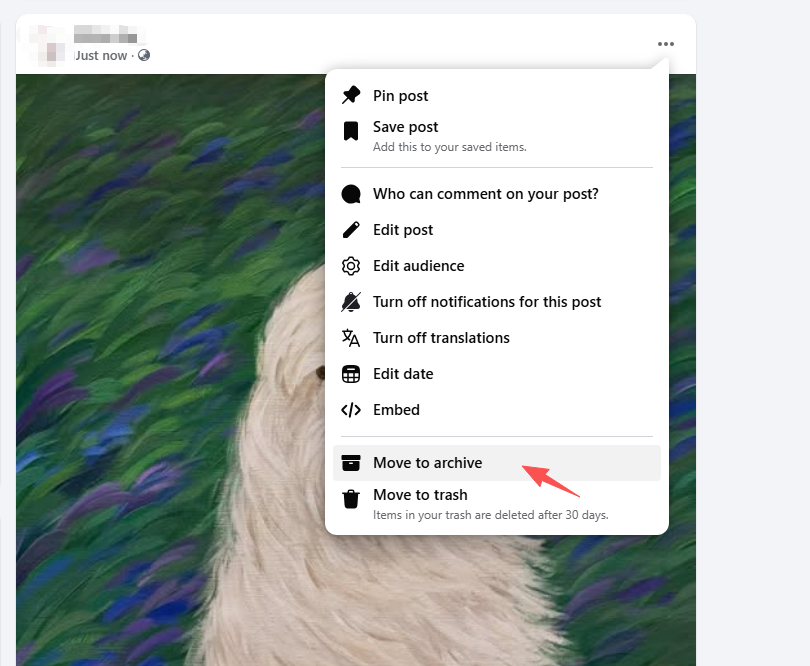
Der Beitrag wird sofort aus Ihrer Timeline verschwinden, bleibt aber in Ihrem Archivordner zugänglich.
Methode 2: Laden Sie Ihr Facebook-Archiv herunter
Öffne Facebook und gehe zu Einstellungen und Datenschutz > Klicken Sie auf Einstellungen > Auswählen Ihre Facebook-Informationen > Klicken Sie auf Laden Sie Ihre Informationen herunter > Wählen Sie: Datumsbereich, Dateiformat (HTML oder JSON) und Medienqualität > Wählen Sie die gewünschten Datenkategorien aus > Klicken Download anfordern .
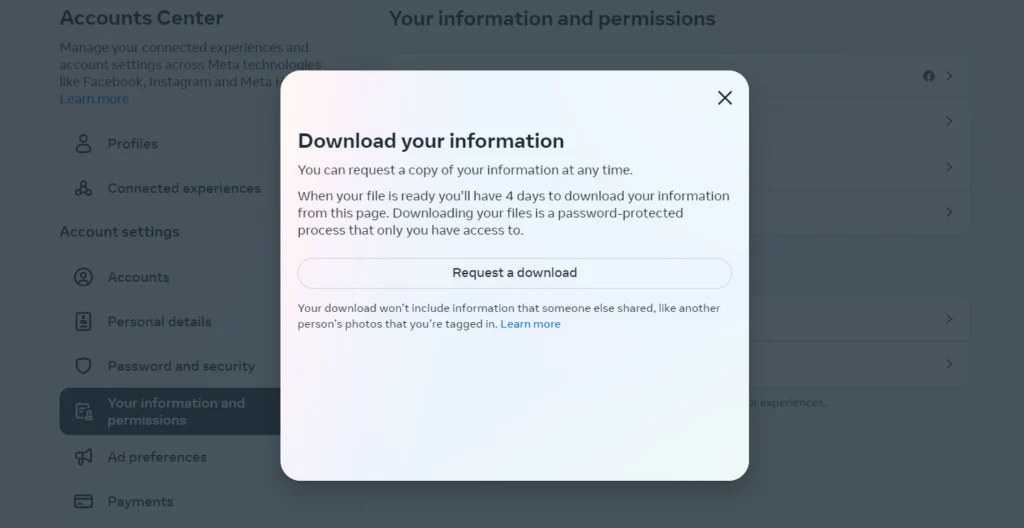
Facebook wird Ihre Anfrage bearbeiten und Sie benachrichtigen, sobald das Archiv fertig ist.
3. Wie finde ich das Facebook-Archiv?
Viele Anfänger archivieren Inhalte, haben aber später Schwierigkeiten, diese wiederzufinden. Glücklicherweise speichert Facebook archivierte Elemente übersichtlich im Aktivitätsprotokoll.
3.1 So finden Sie archivierte Beiträge auf Facebook:
Öffne dein Facebook-Profil > Klicke auf das Dreipunkt-Menü unter deinem Titelbild > Wähle aus Archiv Klicken Sie in der linken Seitenleiste auf Archiv .
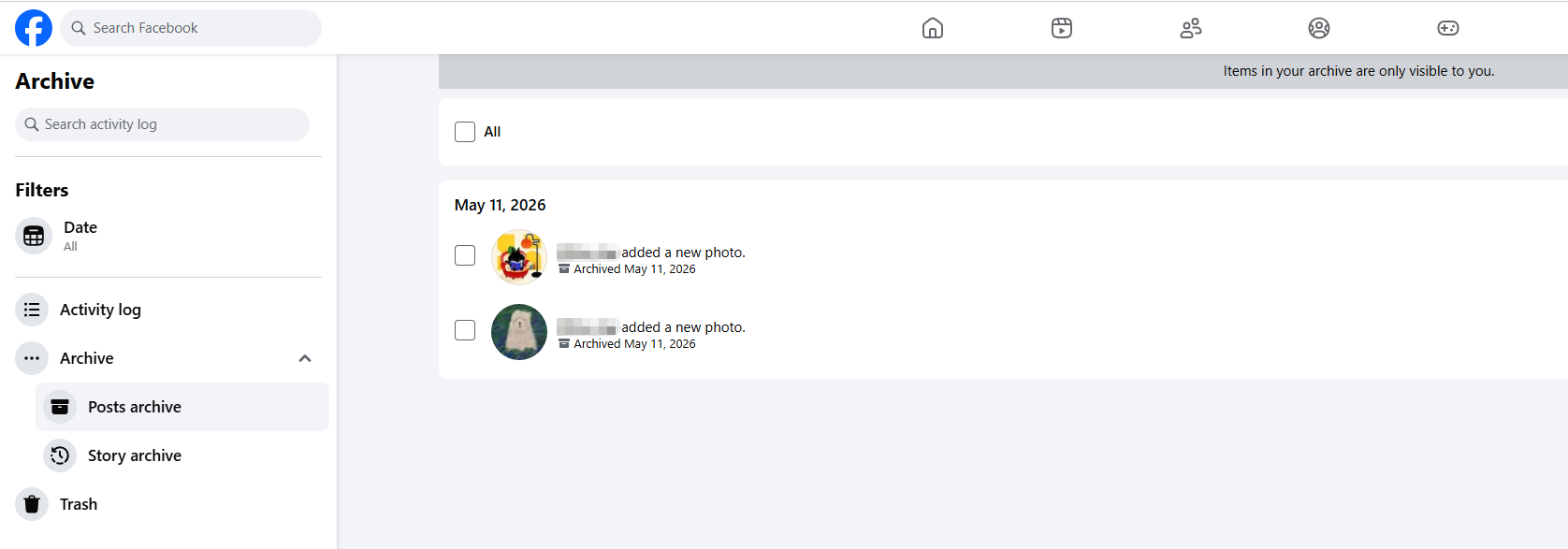
Hier finden Sie alle archivierten Beiträge und Geschichten. Sie können jeden Beitrag jederzeit wieder in Ihre Chronik einfügen.
3.2 Heruntergeladene Facebook-Archive finden
Falls Sie ein herunterladbares Archiv angefordert haben:
- Gehe zu Einstellungen > Deine Facebook-Informationen .
- Offen Verfügbare Dateien .
- Laden Sie das ZIP-Archiv herunter, sobald es verfügbar ist.
Nach dem Herunterladen extrahieren Sie die ZIP-Datei auf Ihrem Computer, um auf Ihre Facebook-Daten zuzugreifen.
4. Vor- und Nachteile des Facebook-Archivs
Wie jede Funktion hat auch das Facebook-Archiv Vor- und Nachteile.
Vorteile:
- Wichtige Erinnerungen und Daten bewahren
- Beiträge ausblenden, ohne sie zu löschen
- Archivierte Inhalte jederzeit wiederherstellen
- Erstellen Sie Sicherungskopien von Fotos, Videos und Nachrichten.
- Zeitleistenorganisation und Datenschutz verbessern
Nachteile:
- Das Herunterladen großer Archive kann einige Zeit in Anspruch nehmen.
- Es ist schwierig, alte archivierte Inhalte zu durchsuchen.
- Heruntergeladene Dateien sind möglicherweise schlecht organisiert.
- Facebook-Archivanfragen können langsam sein
- Facebook selbst bietet nur eingeschränkte Funktionen zur Massenverwaltung.
5. Probieren Sie das beste Tool zum Archivieren von Facebook-Profilen aus — Swyshare ArchiveKit
Während die integrierte Archivierungsfunktion von Facebook für grundlegende Bedürfnisse ausreicht, wünschen sich viele Nutzer eine schnellere und besser organisierte Lösung zur Archivierung von Facebook-Inhalten. Hier kommt die Lösung ins Spiel. Swyshare ArchiveKit erweist sich als äußerst nützlich.
Swyshare ArchiveKit ist ein professionelles Archivierungstool, das Nutzern hilft, Online-Inhalte effizienter zu speichern und zu organisieren. Es bietet erweiterte Download- und Archivierungsfunktionen, die über die integrierten Optionen von Facebook hinausgehen.
Hauptmerkmale von ArchiveKit:
- Ermöglichen Sie Nutzern, mehrere Facebook-Seiten mit einem Klick zu archivieren.
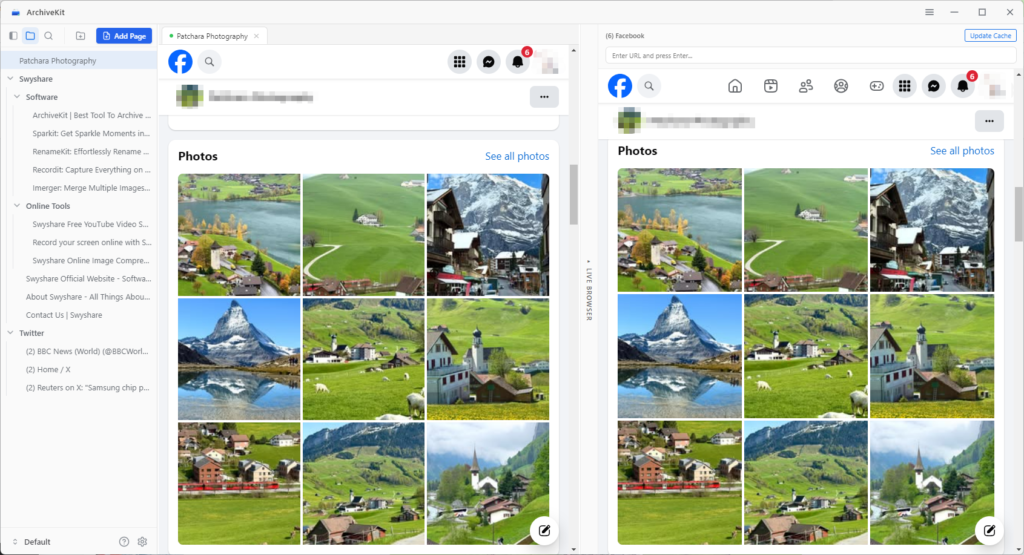
- Erfassen Sie die gesamte Webseite exakt so, wie sie online angezeigt wird.
- Archivierte Facebook-Seiten in Ordnern organisieren.
- Durchsuchen Sie archivierte Seiten, um wichtige Informationen schnell zu finden.
- Archivierte Inhalte werden direkt auf Ihrem Gerät gespeichert, ohne dass eine Cloud-Verfolgung erfolgt.
So archivieren Sie Facebook-Seiten mit ArchiveKit:
- Laden Sie ArchiveKit herunter und installieren Sie es auf Ihrem Windows- oder Mac-Computer.
- Starten Sie ArchiveKit, öffnen Sie den Liva-Browser und fügen Sie die URL der Facebook-Seite ein, die Sie archivieren möchten (Melden Sie sich bei Ihrem Facebook-Konto an, falls die Seite Zugriffsberechtigungen erfordert).
- Scrollen Sie, um die gesamte Seite zu laden, klicken Sie dann auf „Seite hinzufügen“ und wählen Sie „Tiefenarchiv“.
- Warten Sie, bis der Vorgang abgeschlossen ist, dann können Sie die archivierten Facebook-Seiten von Ihrem lokalen Speicher aus verwalten und darauf zugreifen.
6. Fazit
Das Facebook-Archiv ist eine nützliche Funktion für Nutzer, die ihre digitalen Erinnerungen verwalten, wichtige Daten schützen und ihre Facebook-Profile übersichtlich halten möchten. Ob Sie nun alte Beiträge aus Ihrer Chronik ausblenden oder ein vollständiges Backup Ihrer Kontoinformationen herunterladen möchten – Facebook bietet verschiedene Möglichkeiten, Ihre Inhalte sicher zu archivieren und zu bewahren. Die integrierten Archivierungsoptionen von Facebook können jedoch bei einer großen Anzahl von Seiten an ihre Grenzen stoßen.
Für Anwender, die eine schnellere, besser organisierte und effizientere Lösung suchen, Swyshare ArchiveKit bietet eine leistungsstarke Alternative. Mit Funktionen wie der Archivierung von Facebook-Seiten mit nur einem Klick, der vollständigen Erfassung von Webseiten, intelligenter Ordnerorganisation, lokalem Speicher und umfassender Archivierungsunterstützung vereinfacht ArchiveKit das Speichern und Verwalten von Facebook-Inhalten für den langfristigen Zugriff erheblich. Wenn Sie häufig Facebook-Seiten archivieren oder eine bessere Kontrolle über Ihre Online-Daten wünschen, ArchiveKit ist auf jeden Fall einen Versuch wert.